
Connect an assistant
Tolar speaks the Model Context Protocol. An assistant connects the same way a person does — you send it an invite and approve it — and can then read and edit whichever of the two you granted it — the shopping list, the cards, or both — and nothing else in your account.
Before you start
You need Node.js, and Sync & Sharing switched on in the app. The connector is not yet on a package registry, so today it is built from source.
1 — Build it
git clone https://github.com/vStaric/loyaltyCardMcp
cd loyaltyCardMcp
npm install
npm run build
2 — Pair it with your account
Point it at the same backend the app uses, then ask it to pair. It prints a QR code, a connect code and a safety number.
export TOLAR_API_URL=https://api.tolar.vstaric.si
npx tolar-mcp pair
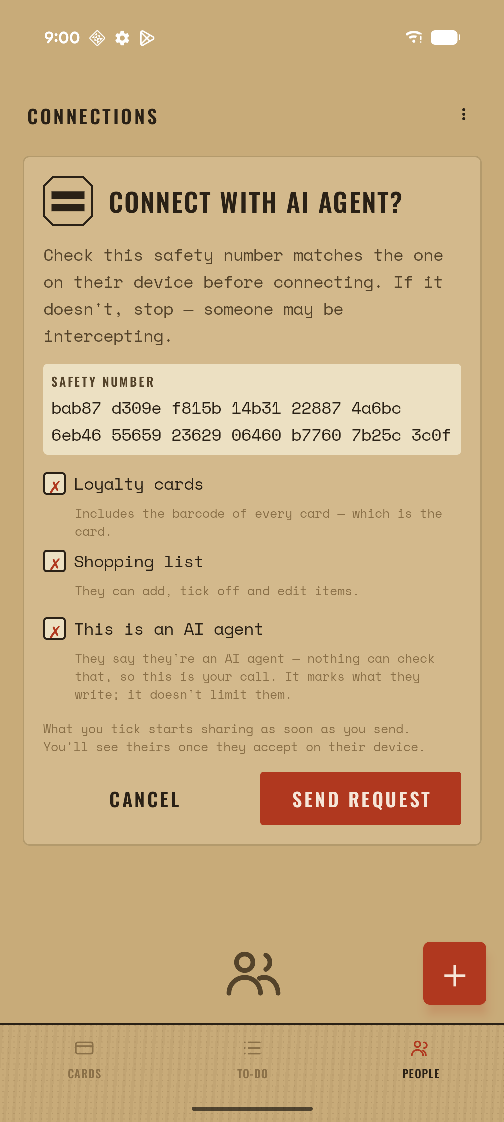
In the app, open People and scan the QR (or paste the code). Approve the request, choosing what to share — the shopping list, the cards, or both. Check that the safety number the app shows matches the one printed in the terminal before you accept.
3 — Add it to your assistant
The connector runs on stdio, which is what an MCP host launches. For a host that reads a JSON config, the entry is:
{
  "mcpServers": {
    "tolar": {
      "command": "npx",
      "args": ["tolar-mcp", "serve"],
      "env": { "TOLAR_API_URL": "https://api.tolar.vstaric.si" }
    }
  }
}
For Claude Code, claude mcp add tolar -- npx tolar-mcp serve does
the same thing.
What it can do
Cards
list_cards, get_card, add_card,
update_card, delete_card. Cards belong to the
account that made them, so an assistant cannot edit yours — it will say so
rather than pretend.
Lists
Read your shopping list, add items, tick them off — the whole list, if you granted it. Edits merge with what you do on your phone rather than overwriting it.
Useful commands
npx tolar-mcp connections     # who this agent shares with, and who is asking
npx tolar-mcp accept 7        # accept a request, after comparing safety numbers
npx tolar-mcp revoke <uuid>   # stop sharing with someone
npx tolar-mcp status          # account id and where its config lives
npx tolar-mcp export-phrase   # the recovery phrase for this agent's own account
The assistant has an account of its own, with its own recovery phrase. Revoking
it in the app stops the sharing from your side; revoke stops it
from the other.